
Search News
Industry Portal
Hot Articles
How Zigbee home automation keeps smart devices working offline
Time
Click Count
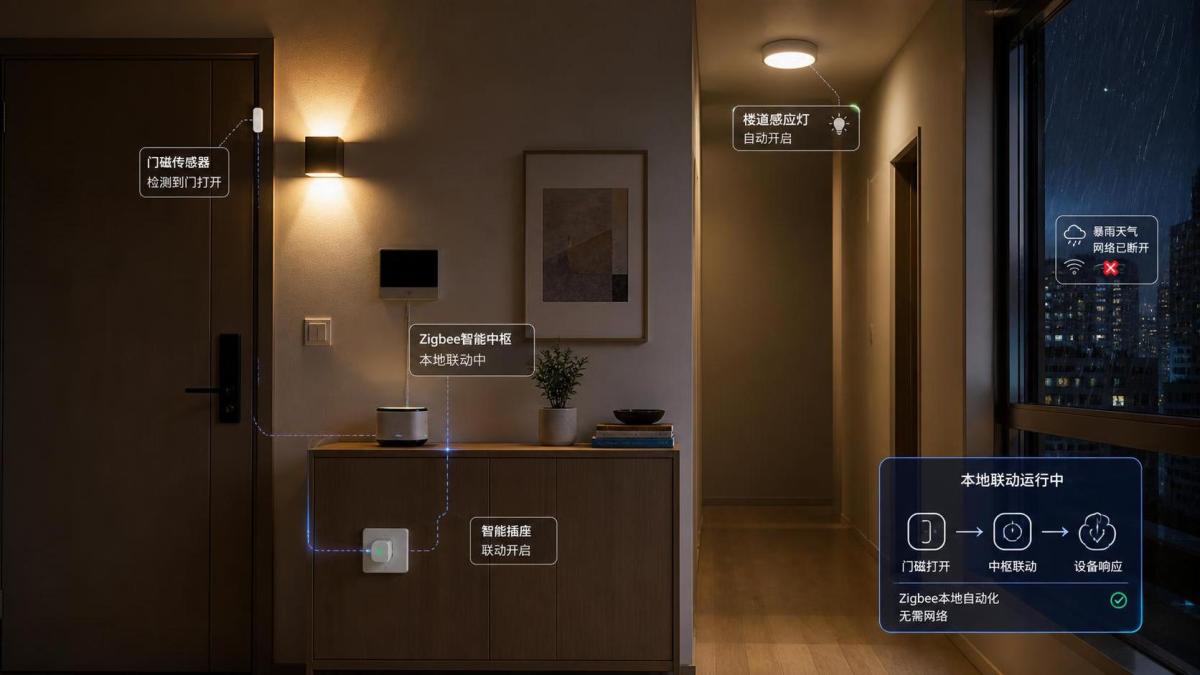
A storm takes down the broadband connection just as you are carrying groceries to the front door. The smart speaker goes silent, but the hallway light still turns on when the door sensor opens. A bedside switch still dims the lamps. Motion lighting in the corridor continues to work through the night. That is the practical promise behind Zigbee home automation: many everyday actions can remain inside the home rather than travelling out to an internet server and back.
For consumers, “offline” does not mean that every smart-home feature becomes available without Wi-Fi or a subscription. It means the parts that matter most in a normal household—local device communication, lighting control, sensor-triggered routines, and in some setups lock or alarm responses—can keep functioning when the internet is unavailable. The difference comes down to the network architecture, the hub you choose, and how each automation is configured.
Why Zigbee can work when the cloud cannot
Zigbee is a low-power wireless protocol designed for devices that send small, frequent messages: a switch press, a motion event, a temperature reading, a command to turn a lamp on, or a signal that a window has opened. Rather than asking every device to communicate directly with a distant cloud platform, a Zigbee system creates a local network within the property.
At the center is usually a Zigbee coordinator. This may be built into a dedicated smart-home hub, a lighting bridge, or a security controller. It forms the network, keeps track of connected devices, and can run automation rules. When a sensor detects movement, for example, it sends a local radio message to the coordinator. The coordinator evaluates the rule and tells the relevant lights to turn on—often without any need for an internet connection.
That local path is short and purposeful:
- A sensor, button, lock, or light sends a Zigbee command.
- The command travels through the local Zigbee network.
- The hub or another bound device applies the rule.
- The target device responds inside the home.
Cloud-based services may still add useful layers, such as remote access from work, firmware downloads, notifications, historical reports, and voice-assistant integrations. But the basic radio conversation does not inherently depend on them. This is why Zigbee is especially appealing for smart lighting, entryway controls, and home monitoring: a temporary broadband outage should not turn ordinary physical tasks into a guessing game.
A mesh network is the quiet engine of reliability
The word “mesh” is often used loosely, but in Zigbee home automation it has a clear practical meaning. Mains-powered Zigbee devices commonly act as routers. Smart bulbs, wired switches, smart plugs, and certain in-wall modules can receive a message and pass it on to another device. Instead of requiring every sensor to reach the hub in one direct leap, the network can use intermediate devices to extend coverage.
Battery-operated sensors generally behave differently. To preserve battery life, they are usually end devices: they sleep most of the time, wake to report an event, and do not relay traffic for others. A battery motion sensor near the garden shed may therefore depend on nearby powered Zigbee routers to maintain a dependable path back to the hub.
In a well-planned home, the mesh becomes stronger as useful powered devices are added around the property. A plug in the hallway, bulbs in the living area, and a wired switch upstairs may give messages several routes to the coordinator. If one path is temporarily weak because of furniture, a closed fire door, or radio noise, another route may be available.
This does not mean every Zigbee installation is automatically resilient. A single hub placed in a metal utility cabinet, a house built with reinforced concrete, or too few powered routers can still produce dead spots. Mesh networking reduces the need for a perfect direct signal; it does not repeal the limits of radio physics.
What continues to work offline—and what usually does not
The most useful question is not “Does Zigbee work without internet?” but “Which actions are truly local in this particular system?” The answer varies by brand and hub design.
Functions that can often remain available
Physical controls: A Zigbee wall switch or handheld remote paired directly with compatible lights can often continue working without internet. This is one reason physical controls remain important even in a highly automated home: visitors, children, and anyone without an app can still use the room naturally.
Local lighting routines: A hub running local rules may keep executing schedules, motion-triggered scenes, and daylight-based adjustments. For example, a PIR sensor can activate low-level hall lighting after dark, while a door contact can trigger entrance lights for a few minutes.
Sensor-to-device actions: Depending on the platform, sensor events can control local lights, plugs, sirens, or ventilation relays. These are especially valuable in safety-oriented scenarios, such as turning on a stair light when movement is detected or flashing selected lights when a leak sensor reports water.
Some access and security behavior: Zigbee locks may still accept keypad codes, fingerprints where supported by the lock itself, or local hub commands during an outage. Likewise, a local alarm controller may continue to react to contact sensors and motion sensors. Yet the exact behavior matters: a lock’s physical access methods are not the same as remote unlock capability, and an alarm sounding locally is not the same as sending a mobile alert.
Functions that generally need internet access
Control from outside the home: If you are away, your phone normally reaches the home system through the internet. No broadband usually means no remote control, unless the system has an alternative local connection or cellular backup.
Cloud voice assistants: Many voice requests rely on remote speech processing. A light may be perfectly reachable through Zigbee while the voice command fails because the assistant cannot interpret it.
Push notifications and cloud video: A door sensor can still detect an opening locally, but a notification to your phone and an uploaded camera clip require an external connection. Cameras are also commonly Wi-Fi or Ethernet devices rather than Zigbee devices because video demands much more bandwidth.
Firmware updates, account management, and some integrations: These usually return once connectivity is restored. A good system should resume gracefully rather than requiring every device to be paired again.
Local automation depends on the hub, not just the Zigbee logo
One common buying mistake is to treat Zigbee support as a complete guarantee of offline automation. Zigbee defines how devices communicate over the local radio network; it does not force every manufacturer to process every automation locally. A product can have Zigbee hardware yet still lean heavily on a vendor cloud for scheduling, rules, or third-party integrations.
Before buying a hub, bridge, or smart-security controller, look for plain language such as “local automation,” “local processing,” “works during internet outages,” or documentation that identifies which routines run on the hub. Ask a more precise question than “Does it work offline?”: Can this specific trigger and action execute when the WAN connection is unplugged?
It is worth testing after installation. Create one essential routine—such as a front-door contact turning on the entry light—then disconnect the router’s internet uplink without turning off the local network or hub. If the routine still works, it is local. Test the controls you would genuinely rely on: switches, sensor lighting, locks, alarms, and any accessibility-related routines. This simple check is more revealing than a product page full of compatibility badges.
Device compatibility: Zigbee 3.0 helps, but it is not a universal promise
Zigbee 3.0 was created to improve interoperability by bringing earlier Zigbee application profiles into a more unified standard. For consumers, it is generally a sensible starting point when choosing new lights, plugs, sensors, and controllers. Still, “Zigbee 3.0” should be read as a good sign, not a blanket assurance that every advanced feature will appear in every app.
A hub may recognize a third-party bulb and allow basic on/off, dimming, and color temperature control, yet not expose energy monitoring, manufacturer-specific scenes, or special configuration options. Some ecosystems also use their own bridges, onboarding methods, or device lists. In real homes, compatibility is best judged at three levels:
- Can the device join the hub?
- Are the essential functions available locally?
- Will the device act as a stable router or reliable battery end device in that network?
For lighting, prioritize the controls you will use daily: smooth dimming, color temperature range, wall-switch compatibility, and reliable recovery after a power cut. For security devices, prioritize local alarm behavior, tamper reporting, battery status, and clearly documented access permissions. A feature-rich app is less important than predictable behavior at the moment a light, lock, or alert actually matters.
Radio planning matters more than many homeowners expect
Zigbee normally operates in the 2.4 GHz band, the same broad band used by Wi-Fi, Bluetooth, and various household electronics. This shared space does not make Zigbee unsuitable; it simply means placement and channel planning matter.
Start with the coordinator in a reasonably open, central location—not behind a television, inside a metal rack, or pressed against a Wi-Fi router. Add powered Zigbee routers gradually across larger homes, particularly near stairwells, detached garages, and exterior-facing doors. Smart plugs are often useful repeaters because they remain powered even when a wall switch turns a bulb off.
Be cautious about treating every bulb as an ideal router. Some lighting products can be poor repeaters, and a bulb that is regularly switched off at the wall stops helping the mesh. In rooms where the wall switch must remain usable, a wired smart switch or a smart relay may create a more stable arrangement than relying exclusively on smart bulbs.
If you experience delayed commands or devices dropping offline, do not immediately blame the sensor. Check hub placement, nearby Wi-Fi equipment, the number of powered routers, and whether the Zigbee channel overlaps heavily with local Wi-Fi activity. Changing channels after a network is fully populated can require care or re-pairing in some ecosystems, so it is better to plan early.
Offline reliability is also a security decision
Keeping routine commands local can reduce dependence on external services and limit the amount of everyday device activity that has to leave the home. That does not eliminate security responsibilities. A Zigbee network should use modern security practices supported by its hub and devices, and the hub account should have a strong unique password with multi-factor authentication enabled where available.
For door locks and access systems, avoid designing a setup that has only one digital path. Keep conventional emergency access arrangements appropriate to the property, make sure household members understand how the lock behaves during a power or internet outage, and review who has guest codes or app permissions. Smart access is most reassuring when it strengthens ordinary household routines instead of making them fragile.
Power is the other half of the offline equation. Zigbee may continue communicating when broadband fails, but a hub, router device, or wired light still needs electricity. If uninterrupted operation is important, consider a suitable backup power solution for the coordinator, internet equipment, and critical low-voltage hardware. Battery sensors can keep reporting, but their messages need a powered network path and controller to become useful actions.
Building a Zigbee home that behaves sensibly in the real world
A dependable setup does not need to automate every object in the house. Begin with routines that remove small daily frictions while retaining an obvious manual fallback: entry lights controlled by a contact sensor, a bedside button for an evening scene, a bathroom humidity sensor that runs a fan relay, or a hallway motion routine that remains active even when the broadband provider has an outage.
Then separate “essential local behavior” from “nice-to-have cloud behavior.” Lighting at the stairs, local lock access, and an audible alarm may belong in the first category. Remote notifications, holiday simulations, voice control, and cross-platform dashboards may belong in the second. This distinction makes purchasing decisions clearer and helps prevent disappointment when an internet disruption occurs.
The value of Zigbee home automation is not that it makes the home independent of every service or every power failure. Its strength is more grounded: it lets compatible devices communicate close to where life happens. When a sensor sees movement, a switch is pressed, or a door opens, the response can remain local, quick, and understandable. For a home built around lighting comfort, practical access control, and everyday safety, that is a meaningful kind of intelligence.
Recommended News