
Search News
Industry Portal
Hot Articles
How to specify flicker-free commercial LED luminaires for offices
Time
Click Count
How to Specify Flicker-Free Commercial LED Luminaires for Offices
Specifying commercial LED luminaires for an office used to be a relatively simple exercise: achieve the required illuminance, control glare, meet the energy target, and stay within budget. LED technology has made the decision more complicated in a useful way. A fitting can look efficient on a datasheet while still creating visual discomfort, poor video performance, unreliable dimming, or a controls problem that surfaces only after ceilings are closed.
For project managers, “flicker-free” should not be treated as a vague product claim. It is a performance requirement that connects the LED module, driver electronics, dimming method, control architecture, electrical installation, and the way people actually use the office. The right specification protects more than visual comfort. It reduces avoidable commissioning disputes and helps ensure that a workplace works equally well for focused desk tasks, video calls, collaborative rooms, circulation areas, and camera-equipped access points.
The practical starting point is to stop evaluating the luminaire as a standalone object. A commercial lighting system is an electrical and digital system. Its optical output is only as stable as the driver, the incoming supply, and the command signal that tells it what to do.
What “Flicker-Free” Actually Means in an Office
Flicker is variation in light output over time. Some variation is visible as a direct shimmer; other forms are not consciously seen but may appear under motion, in peripheral vision, or when a camera records the space. The familiar “flicker-free” label is therefore incomplete unless it is supported by test conditions and measurable results.
The source is often the LED driver. LEDs respond rapidly to changes in current. A driver using poor filtering, unsuitable pulse-width modulation, or an incompatible dimming interface can create substantial modulation in light output. Mains frequency and the electrical topology of the driver can also matter. The problem is not confined to low-cost fittings: even a sound luminaire design can perform badly when paired with an untested control device or installed on a disturbed circuit.
For office specifications, ask suppliers to state the measurement method, operating point, dimming level, input conditions, and metric rather than simply confirming that a product is flicker-free. Commonly referenced approaches include percent flicker and flicker index, while newer assessments may use short-term flicker indicator (Pst LM) and stroboscopic visibility measure (SVM). IEEE 1789 is frequently cited in discussions of LED modulation, but it is not a substitute for a project-specific performance brief. Local regulations, client standards, and applicable luminaire requirements still need to be checked separately.
A key point for procurement teams: a measurement at full output does not describe the whole system. Many office luminaires behave acceptably at 100% but show more modulation at low dimming levels. Since daylight harvesting and occupancy strategies often keep fittings below full output for much of the day, dimmed performance deserves equal attention.
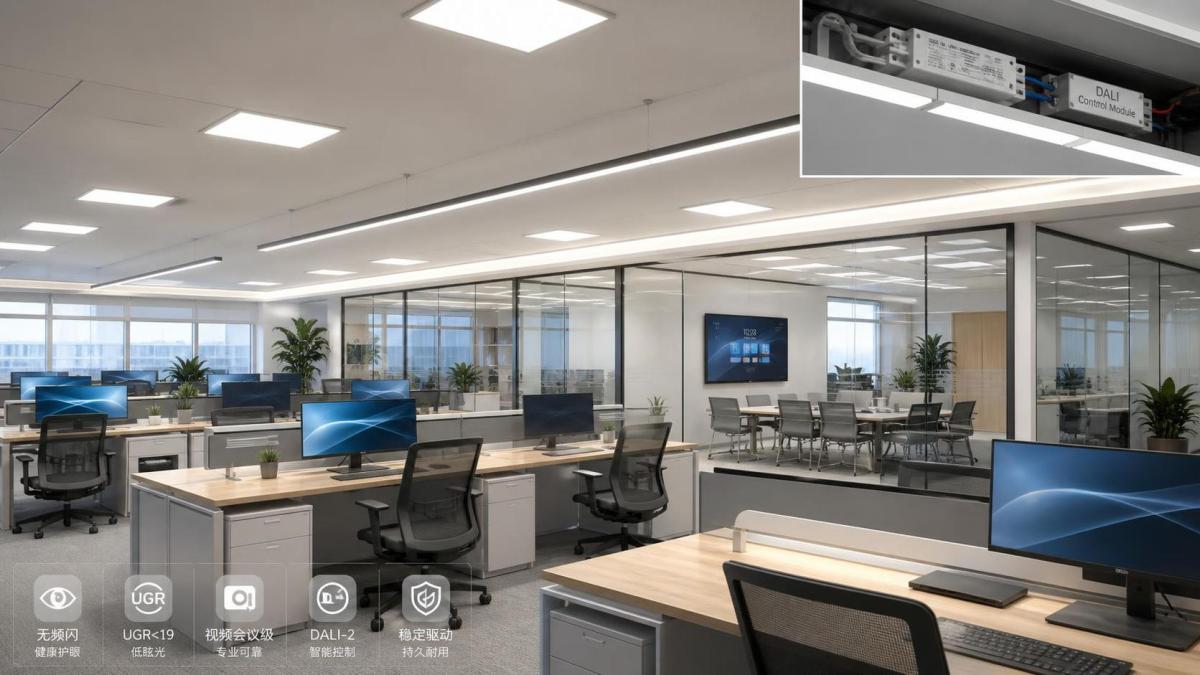
Write the Requirement Around the Space, Not a Marketing Claim
There is no single office lighting brief. Open-plan desks, executive meeting rooms, reception areas, training suites, and technical workspaces place different demands on the same lighting infrastructure. A useful luminaire schedule identifies the task, the occupancy pattern, the presence of cameras, the available daylight, ceiling geometry, and the control zones before it names a product family.
In a general office, visual comfort combines stable output with sensible illuminance distribution, glare control, and colour consistency. Screens intensify the issue. Employees may not describe a complaint as “temporal light modulation”; they may report tired eyes, a distracting shimmer near a monitor, or a room that feels unpleasant during long tasks. Those symptoms can have multiple causes, so lighting should be reviewed alongside display settings, daylight contrast, and workstation layout. Still, flicker should not be dismissed because it is difficult to identify by eye.
Meeting rooms bring another variable: video. Camera shutter speeds, frame rates, rolling-shutter effects, and LED modulation can interact unpredictably. A fitting that is satisfactory for occupants may cause banding or brightness variation in recorded content. If rooms will host hybrid meetings, include camera testing in the mock-up or sample-room process. This is faster and cheaper than trying to correct a ceiling-wide issue after handover.
The Driver and Dimming Interface Need to Be Specified Together
A driver is not an interchangeable accessory. It determines dimming behavior, output stability, power quality characteristics, serviceability, and, in many cases, the realistic life of the luminaire. Require the luminaire manufacturer to identify the driver model or approved driver configuration, especially where a project requires consistent behavior across several fitting types.
The control protocol should follow the project’s operational needs. DALI-based systems are commonly selected where addressability, scene control, feedback, and future reconfiguration are important. Wireless approaches, including Zigbee-based options, can be useful in refurbishment projects where additional control wiring would be disruptive. Phase-cut dimming may suit limited retrofit work, but it is usually the area where compatibility needs the most careful confirmation. The controller, driver, and luminaire must be tested as a combination—not merely listed as individually compatible with a broad category of controls.
Ask four direct questions during technical submittal review:
- At what dimming range does the stated flicker performance apply?
- What control devices, gateways, and dimming methods were used during verification?
- What is the minimum stable light level, and does the fitting switch off below it?
- Will emergency lighting operation, sensor overrides, or power restoration produce a visible flash or an unwanted default scene?
These questions may seem operationally minor during design. They become highly visible when staff arrive to find luminaires popping on at full brightness after a temporary outage, or when daylight sensors cause an otherwise good office to pulse between dimming levels. Controls programming should include fade times, sensor hold periods, manual override rules, and a clear strategy for local versus central control.
Do Not Trade Visual Quality for Wattage
Energy efficiency remains central to commercial LED luminaires, but watts per square metre is not a complete decision criterion. Overly aggressive power reduction can lead to insufficient vertical illumination, poor uniformity, glare from a small high-luminance emitting area, or a control scheme that occupants continually override. The operational result may be worse than a slightly higher connected load with reliable dimming and proper zoning.
Evaluate optical distribution alongside efficacy. A broad diffuse distribution may work well in an open office with regular desk spacing. A more controlled optic can be preferable near perimeter zones, circulation routes, or high-ceiling spaces. Unified glare rating, where relevant to the project’s lighting calculation method and local practice, should be reviewed as part of the design rather than copied from a catalogue line. A reported value depends on the installation geometry, room reflectances, observer position, and luminaire arrangement.
Colour quality also affects whether a finished office feels coherent. Specify the required correlated colour temperature and colour rendering level, but also ask how colour consistency will be managed across batches and replacement stock. In large floors, small differences between luminaires can become obvious, particularly after partial maintenance. Tunable-white systems add flexibility, yet they also require a clear operational purpose. If no one owns the scenes or understands the controls, a sophisticated feature can become a permanent fixed setting with added cost and complexity.
Use a Sample Area to Expose Problems Before Installation
For substantial office projects, a representative mock-up is one of the most practical risk controls available. Install the intended luminaire, driver, sensors, wall stations, control gateway, and ceiling finish in a realistic arrangement. Review it at full output and at the low end of the proposed dimming range. Observe direct glare from typical seated positions, check light on desks and vertical surfaces, and run camera tests using the equipment likely to be used in the building.
The sample area should also test the unglamorous events that create handover problems: startup, sensor-triggered activation, scene recall, loss and return of power, and emergency-mode interaction. If the project includes smart access, visitor management, or biometric terminals, assess lighting where faces are captured rather than treating security and lighting as unrelated packages. Stable, appropriately directed illumination supports reliable imaging without turning an entrance into a visually harsh zone.
This systems view is increasingly important in AIoT-enabled buildings. At SHSS, smart lighting is considered alongside physical security, industrial hardware, and the broader infrastructure that keeps commercial spaces dependable. The common thread is not a preference for complexity; it is the need to verify interfaces. A good luminaire can be undermined by a bad command signal just as a strong physical component can fail in a poorly coordinated assembly.
Build the Specification Around Evidence and Maintainability
A robust schedule for office lighting should request photometric files suitable for the design calculation, driver and control details, declared flicker-performance information, lumen maintenance information, warranty terms, operating temperature limits, ingress protection where needed, and replacement or repair arrangements. Do not assume a long rated LED life means the whole fitting will be maintenance-free. Drivers, sensors, wireless nodes, and emergency components may have different replacement paths and lead times.
For occupied buildings, access matters as much as the nominal service interval. Can the driver be replaced from below the ceiling? Will changing it require removing a large ceiling section? Are spare parts identifiable and available through the intended maintenance channel? These questions have more value than a broad promise of longevity.
Finally, make acceptance criteria explicit. The contractor should know what documents, settings, functional tests, and commissioning records are required before practical completion. If flicker performance is critical, agree in advance whether a supplier declaration, independent test information, site measurement, or a combination is required. The appropriate approach depends on risk, budget, local obligations, and how consequential the space is.
The best specification for flicker-free commercial LED luminaires is not the longest one. It is the one that defines the office tasks, demands evidence at the operating conditions that matter, protects compatibility between drivers and controls, and gives the facilities team a system they can understand and maintain. That is how a lighting decision remains sound long after the initial energy calculation has been approved.
Recommended News