
Search News
Industry Portal
Hot Articles
Brushless vs. brushed drills: Is the extra cost worth it?
Time
Click Count
A brushless drill is usually worth the extra cost if you use it frequently, work on demanding projects, or value longer runtime between battery charges. For occasional furniture assembly, hanging shelves, or drilling a few holes, a capable brushed drill can do the job without the premium. Neither motor type guarantees that a particular drill will be powerful, comfortable, or reliable.
The difference between brushless and brushed drills lies in how their motors transfer electrical energy. That affects efficiency and maintenance, but the practical decision also depends on battery capacity, the drill’s size, the work you plan to do, and what comes in the kit. A cheaper drill that lacks a battery or charger may not be the cheaper way to start.
What changes inside the motor?
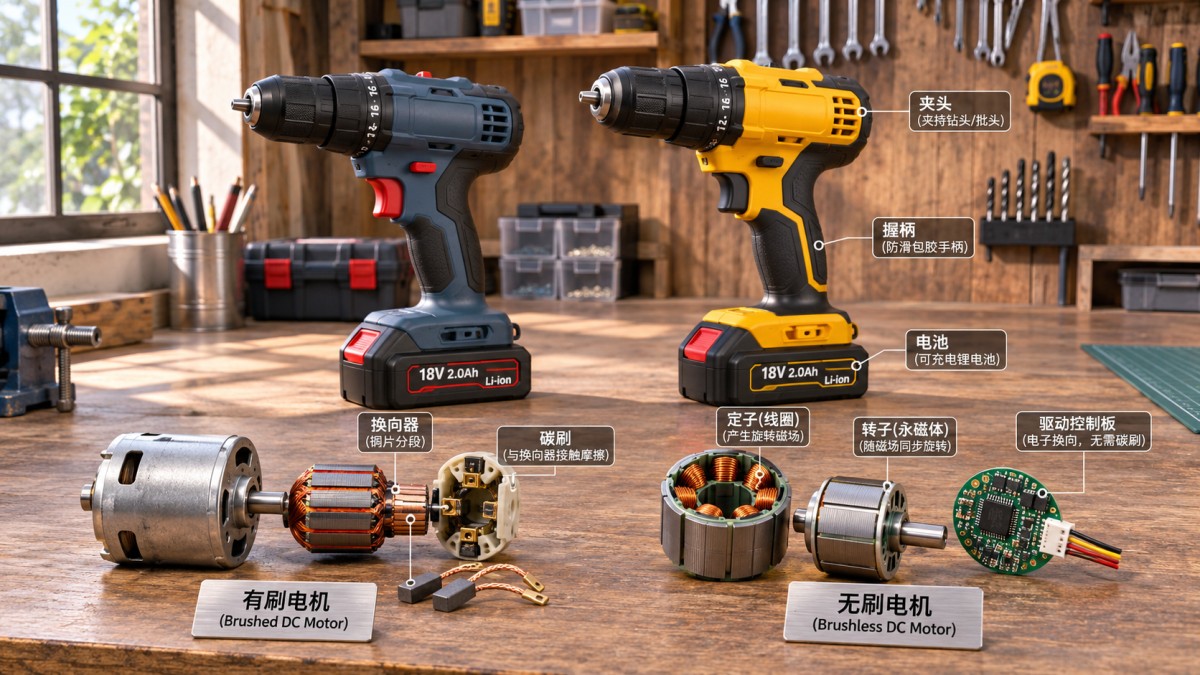
A brushed motor uses small carbon brushes that make physical contact with a rotating part called the commutator. As the motor turns, this contact switches the current to keep it spinning. The brushes gradually wear, and friction and electrical losses produce heat. Depending on the drill’s design, worn brushes may be replaceable, although access and parts availability vary.
A brushless motor uses electronic controls to switch current instead of relying on those contacting brushes. With no motor brushes to wear out, it removes one routine wear component and can operate more efficiently. The controller can also adjust motor operation to changing demands, although the exact behavior depends on the drill’s design.
Brushless does not mean maintenance-free or immune to failure. Gears, bearings, switches, electronics, batteries, and chucks can all wear or be damaged. Conversely, a brushed drill is not a disposable tool simply because it has brushes.
Where the extra money can make a difference
More work between charges
Brushless motors typically waste less energy as heat, so a brushless drill may complete more work on the same battery charge. That advantage matters when you are driving many screws, working away from an outlet, or sharing batteries among several tools. Fewer interruptions can be more valuable than the efficiency difference itself.
Do not assume that every brushless drill outlasts every brushed model. Battery capacity, battery condition, drill gearing, bit sharpness, material, and workload all affect runtime. A brushed drill with a larger battery may run longer than a brushless drill supplied with a smaller one. Compare the complete kits, not just the motor labels.
Repeated or demanding work
Drilling larger holes in timber or driving long screws places more load on a drill than assembling a flat-pack cabinet. Under sustained work, efficiency and heat management become more important. A suitable brushless model may be a better fit for frequent projects, especially when a compact tool and longer runtime are useful.
Even so, the motor is only one part of the system. A small brushless drill is not automatically better suited to a large hole saw than a more substantial brushed drill. Check the manufacturer’s recommended capacities for the material and bit, and use the appropriate speed. If the drill repeatedly stalls or becomes excessively hot, stop and let it cool rather than forcing it to finish.
Brush wear and repairs
Brushes are a consumable part, but occasional users may never wear them out during the useful life of the drill. For someone who uses a drill regularly, avoiding brush replacement can be a practical advantage. Before buying a brushed model, check whether its brushes are serviceable and whether replacement parts are available; some designs make that job easier than others.
A brushless motor also relies on electronic components. If those fail outside the warranty period, repair may be uneconomical. Neither design eliminates the need to consider warranty terms, service options, and the availability of replacement batteries.
Match the drill to the job, not just the motor
Occasional household jobs: A brushed drill is often enough for assembling furniture, installing hardware, and drilling small holes in wood or similar materials. Look for a comfortable grip, variable-speed trigger, and adjustable clutch. Spending less on the motor can leave room in the budget for quality bits and fasteners, which have a direct effect on the result.
Regular DIY and renovation: If the drill comes out often for cabinetry, repairs, or building projects, a brushless model becomes easier to justify. Runtime, compact size, and reduced brush maintenance are more useful when the tool is used repeatedly. Compare its rated capabilities with the largest bits and screws you actually expect to use.
Heavy or specialized drilling: Choose by the task first. For occasional holes in masonry, a drill with a hammer-drill mode and the correct masonry bit may be appropriate; ordinary drill mode alone is not the same thing. More demanding masonry work may call for a rotary hammer rather than either type of standard drill. For concrete, metal, or large-diameter holes, follow the tool and bit manufacturers’ capacity and speed guidance.
For driving many long fasteners, an impact driver may be useful alongside a drill. It delivers rotational impacts and uses a different chuck system, so it is not a direct replacement for every drilling task. Motor type does not change that distinction.
Compare the whole kit before comparing prices
The drill advertised at the lowest price may be a bare tool, sold without a battery or charger. That can be a good purchase if you already own compatible batteries, but it can cost more to put to work if you do not. A kit’s contents can also make two apparently similar offers hard to compare.
- Check what is included. Confirm the number and capacity of batteries, whether a charger is supplied, and whether bits or a case are included. Do not assume accessories shown elsewhere in a listing come with the drill.
- Compare battery compatibility. Batteries are generally designed for a particular tool system. An existing compatible battery and charger can make a bare tool attractive, but verify compatibility for the specific drill and battery.
- Look at capacity as well as voltage. Battery voltage alone does not tell you how long a drill will run or how much work it can perform. Capacity, commonly listed in amp-hours, is relevant to runtime; motor, gearing, and workload matter too.
- Try the controls and balance. A heavier battery may extend runtime but make overhead work or confined-space use less comfortable. Check that you can reach the forward/reverse switch and hold the drill securely with the battery fitted.
- Read the warranty and service terms. Drill, battery, and charger coverage may differ. Check what is covered, for how long, and what service is available where you live.
A larger battery is not always the right upgrade. For short household jobs, a lighter battery and access to a charger may be more useful than carrying extra weight. For longer sessions, a second battery can reduce waiting, provided it is compatible and charged before work begins.
Specifications that deserve more attention than the label
Torque and gearing: Torque describes turning force, but published figures are not always directly comparable across tools because test and reporting methods can differ. A drill with a low-speed gear is useful for higher-load work; a higher-speed gear helps with appropriate smaller drilling tasks. Use the manufacturer’s material and bit-size limits alongside the stated torque.
Clutch settings: An adjustable clutch helps limit driving force when installing screws, reducing the chance of stripping a screw head or driving too deeply. Start at a low setting and increase it until the screw seats properly. Drill mode normally bypasses the clutch for drilling; the hammer setting, if fitted, serves a different purpose.
Chuck and bit fit: Check the chuck’s maximum capacity against the shanks of the bits you plan to use. A larger capacity is helpful only if the drill is also rated for the intended bit and material. Tighten the chuck securely and use an undamaged bit appropriate to the task.
Size and control: A compact drill can be easier to position inside a cabinet or between framing members. More power is not always helpful for delicate hardware: a controllable trigger, suitable clutch setting, and correct driver bit can matter more when working with small screws.
Making the cost decision
Start with the complete price of the brushed and brushless kits that meet your requirements. Then ask what the extra spend buys in that comparison: perhaps a second battery, a smaller body, a better chuck, or a longer warranty as well as a different motor. Those features should not be credited to brushless technology alone.
For a drill used a few times a year, pay extra only if the specific brushless model offers something you will use. For frequent projects, the premium may be reasonable when longer runtime, manageable weight, and suitable capacity reduce interruptions. If neither kit fits the work—for example, both are under-specified for the holes you need to drill—choose a more appropriate tool rather than treating motor type as the deciding feature.
Recommended News