
Search News
Industry Portal
Hot Articles
Keyless Entry Systems: Common Failure Points and How to Prevent Lockouts
Time
Click Count
Keyless Entry Systems: Common Failure Points and How to Prevent Lockouts
Keyless entry systems can simplify access control, but small faults often create bigger operational problems than expected.
A delayed unlock event can interrupt loading, maintenance, inspections, and emergency response within minutes.
That is why failure analysis matters just as much as installation quality.
Most lockouts do not start with catastrophic damage.
They begin with low battery voltage, dirty readers, loose wiring, outdated firmware, or poor door alignment.
For teams maintaining buildings, workshops, utility rooms, and smart facilities, prevention is usually cheaper than emergency recovery.
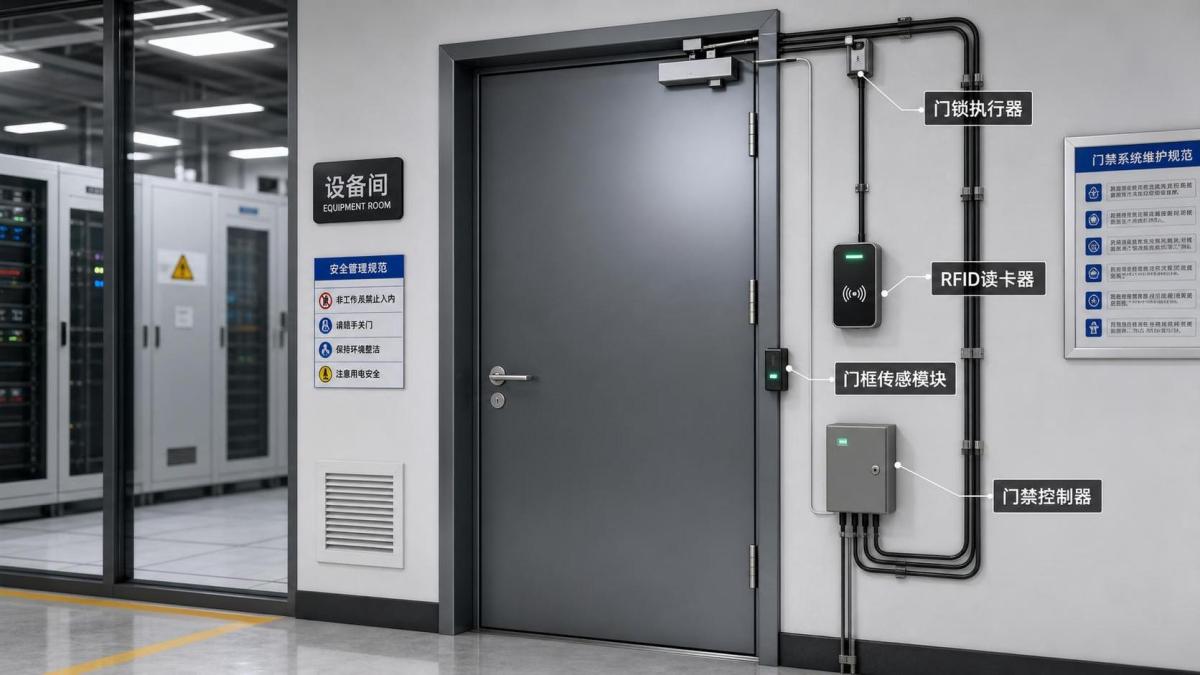
This guide breaks down the most common keyless entry systems failure points and the practical steps that reduce avoidable lockouts.
The focus is simple: faster troubleshooting, better uptime, and fewer access disruptions.
Why Keyless Entry Systems Fail More Often Than People Assume
Keyless entry systems combine electronics, mechanics, software, and user behavior.
That mix improves convenience, but it also creates multiple weak points.
A physical key may fail in one obvious way.
Digital access systems can fail through power loss, signal interference, credential mismatch, sensor drift, or controller communication errors.
In real sites, the issue is often cumulative rather than isolated.
For example, a weak battery may slow the actuator, while a sagging door increases latch pressure.
The result looks like a software fault, even though the root cause is mechanical stress.
This is why effective maintenance of keyless entry systems always starts with system-level thinking.
Battery and Power Problems
Power issues are among the most common reasons keyless entry systems stop responding.
They are also among the easiest to prevent.
Typical warning signs
- Slow unlock cycles or delayed relay response
- Intermittent keypad backlight or reader resets
- Low-voltage alarms that appear and disappear
- Mobile credential access failing at random times
- Lock hardware clicking without full retraction
Battery-powered locks are especially vulnerable in cold weather, high-traffic doors, and poorly scheduled maintenance programs.
Even hardwired keyless entry systems can fail when power supplies drift out of tolerance.
How to prevent lockouts
- Replace batteries by cycle count, not just after alarms appear.
- Measure loaded voltage, not open-circuit voltage alone.
- Check backup power modules during every scheduled inspection.
- Use battery types approved by the lock manufacturer.
- Record temperature-related failures to spot seasonal patterns.
If a site has repeated lockouts, compare battery life against opening frequency.
That simple review often reveals under-specified hardware.
Reader, Sensor, and Credential Failures
Many keyless entry systems depend on clean credential reads and stable sensor performance.
When that chain breaks, users often assume the lock itself has failed.
In practice, the weak point may be the keypad, RFID reader, fingerprint module, BLE receiver, or door position sensor.
Common causes
- Dust, moisture, oil, or cleaning residue on sensor surfaces
- Credential desynchronization after software updates
- RF interference from nearby equipment or metal structures
- Worn keypad contacts or damaged touch panels
- Biometric mismatch caused by poor enrollment quality
This becomes more visible in mixed-use sites where access methods vary by shift, zone, or security level.
A system that works perfectly for cards may still struggle with biometrics in humid entryways.
Practical prevention steps
- Clean reader windows and biometric surfaces with approved materials.
- Re-enroll users when false rejections start increasing.
- Audit event logs for repeated denied reads on valid users.
- Test read range after nearby equipment changes or renovations.
- Keep at least one alternate credential method active for critical doors.
That last point matters more than many teams expect.
Redundancy in keyless entry systems is not a luxury when uptime affects operations or safety.
Mechanical Misalignment and Door Hardware Stress
Not every access problem is electronic.
Some of the most persistent keyless entry systems failures begin with the door, frame, closer, hinges, or strike alignment.
When the latch binds, the lock motor works harder, current draw rises, and unlock reliability drops.
The symptom may look random, but the pattern is usually load-related.
Look for these field indicators
- Unlock succeeds only when the door is pushed or pulled
- Strike plates show uneven wear marks
- Closer speed changes with weather or internal pressure
- Doors drag at the threshold or frame edge
- Latch retraction sounds strained or inconsistent
In facilities with heavy traffic, this issue can develop gradually and escape notice for months.
The more obvious signal is rising service frequency on the same opening.
Prevention checklist
- Inspect hinge wear and frame movement during every quarterly visit.
- Verify latch and strike alignment with the door fully closed.
- Adjust closers to reduce slam and rebound.
- Check weather seals that create excess closing resistance.
- Measure actuator current when mechanical drag is suspected.
For many lockouts, correcting alignment solves the issue faster than replacing electronics.
Wiring, Network, and Controller Issues
Hardwired keyless entry systems rely on stable communication between readers, controllers, power supplies, and management platforms.
A loose terminal or unstable network segment can trigger intermittent failures that are difficult to reproduce.
Frequent failure points
- Broken conductors at moving door loops
- Corrosion in outdoor junction points
- Voltage drop on long cable runs
- Controller resets caused by unstable power
- Network latency affecting cloud-managed unlock commands
Cloud-connected keyless entry systems add convenience, but they also introduce dependency on network health and update discipline.
That does not make them unreliable.
It simply means preventive maintenance must include communication checks, not only lock hardware checks.
What works in the field
- Inspect door loops and flex points for conductor fatigue.
- Measure voltage at the lock under operating load.
- Review controller logs for resets, offline periods, and relay faults.
- Confirm firmware compatibility after platform upgrades.
- Segment critical access doors from unstable shared networks.
When a lockout seems random, event timestamps often reveal a network or controller pattern.
Software Glitches and Poor Update Control
Software rarely gets blamed first, yet it can quietly destabilize keyless entry systems.
This happens when firmware, mobile apps, credential databases, and access policies drift out of sync.
One update can improve cybersecurity while creating unexpected behavior at the edge device.
High-risk scenarios
- Firmware pushed without field validation
- Expired certificates blocking secure device communication
- Credential rules changed without user resync
- App updates altering Bluetooth permissions
- Database corruption after abrupt controller shutdowns
From a maintenance perspective, change control is the real safeguard.
If no one tracks what changed, diagnosis takes longer and repeat failures become likely.
Better update discipline
- Test updates on a limited group of noncritical doors first.
- Keep rollback files and configuration backups available.
- Document every firmware, app, and policy change by date.
- Verify credential validation after each update window.
- Coordinate software changes with physical access schedules.
This approach reduces downtime and prevents software-driven lockouts from spreading across multiple openings.
A Practical Lockout Prevention Routine
The best protection against lockouts is a repeatable maintenance routine for keyless entry systems.
It should be simple enough to repeat and detailed enough to catch small drift early.
If a site has critical rooms, add a response plan for failed credentials, dead batteries, and network outages.
That plan should include backup entry methods, escalation contacts, and log review steps.
Final Takeaway
Reliable keyless entry systems do not depend on one strong component.
They depend on balanced performance across power, credentials, mechanics, wiring, and software.
When teams treat lockouts as preventable system failures, troubleshooting becomes faster and downtime drops.
The most effective next step is to turn today’s recurring issues into a fixed inspection checklist.
That is how keyless entry systems move from convenient technology to dependable infrastructure.
Recommended News